Web accessibility for everyone
Why websites should be accessible to everyone, what the WCAG guidelines cover and what is new in version 2.2.
Update
We wrote this article in November 2023. Since 28 June 2025, the European Accessibility Act has applied across the EU. It also requires accessibility from online shops, banking services and other digital services for consumers.
It is increasingly important for websites and applications to be equally accessible to all users, regardless of disability. That way everyone has the same access to information and can comfortably shop online, use online banking or deal with public authorities. Keeping this in mind is the duty of everyone who designs, develops and manages websites.
Web Content Accessibility Guidelines
The Web Content Accessibility Guidelines (WCAG) were created to make the digital world more usable for people with disabilities.
According to the World Health Organization, around 1.3 billion people, roughly 16% of the world's population, live with a significant disability. The first version of WCAG appeared in 1999 and focused on blind and partially sighted users. The 2008 and 2018 versions added measures for people with limited mobility, such as those who have difficulty using their hands.
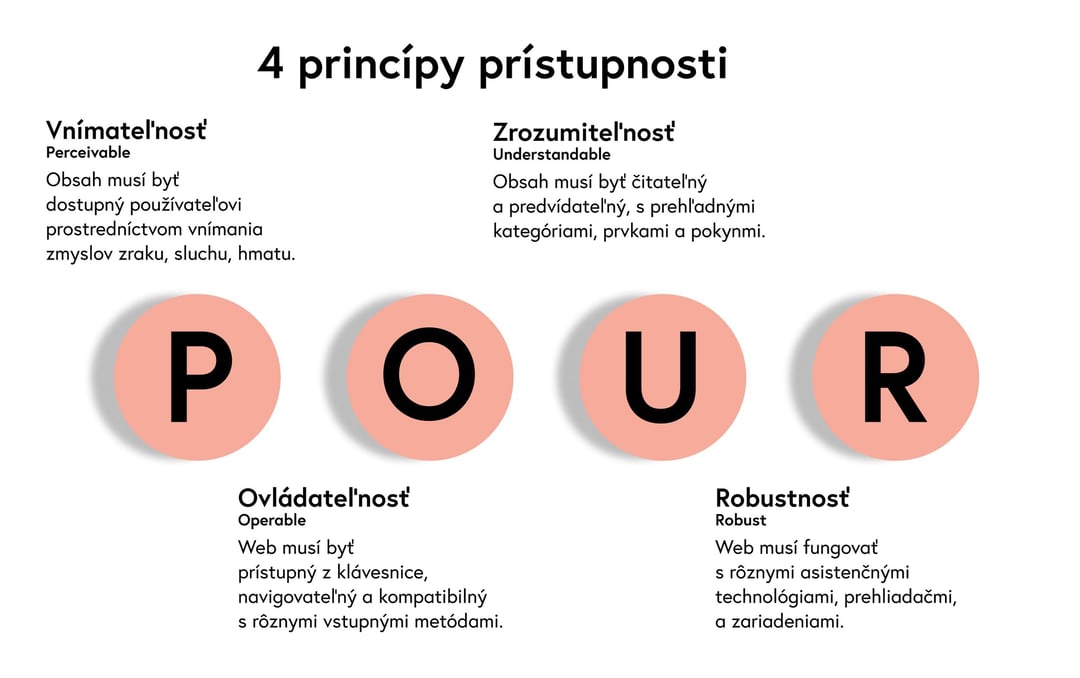
The four principles of accessibility: content must be perceivable, operable, understandable and robust.
Why accessibility pays off
A more accessible website or online service reaches a wider group of people. With a little effort, you present your business to people who are often left on the margins online. You show that you care about equal opportunities for all, improve your brand image and possibly your search engine rankings too.
When accessibility becomes standard in both design and development, it makes projects that must comply with laws and regulations easier. Even unintentional discrimination online can have the same legal and moral consequences for a company as discrimination in the workplace.
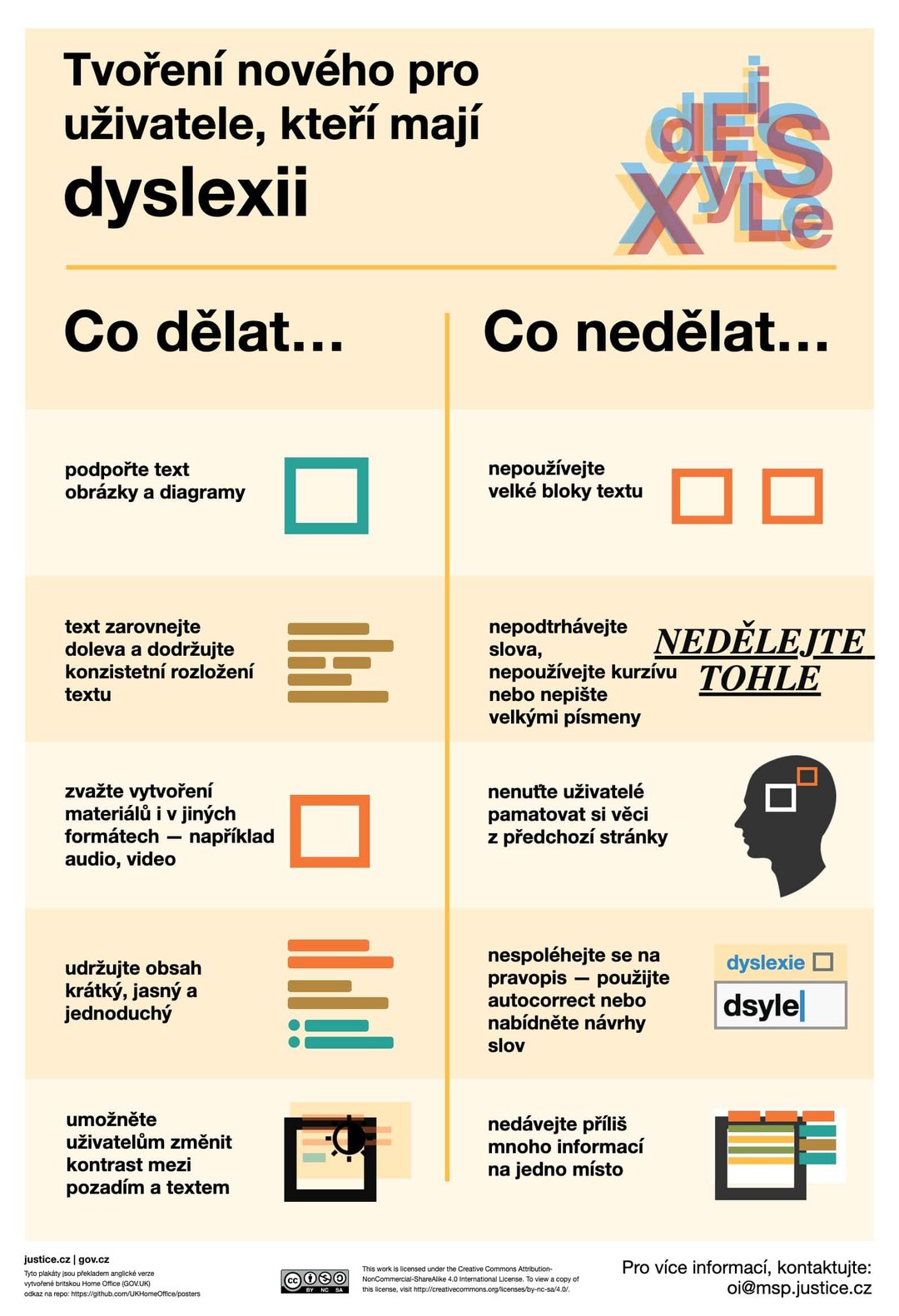
The UK Home Office has produced clear accessibility posters, published in several languages. You can find them all on GitHub.
What following WCAG gives you
- Compliance with laws and regulations.
- A website used by a much wider group of people.
- Proven practices the whole team follows.
- Better usability for every visitor.
One of the most common mistakes is insufficient contrast between text and background. You can check it in a few seconds, for example with the Color Contrast Checker.
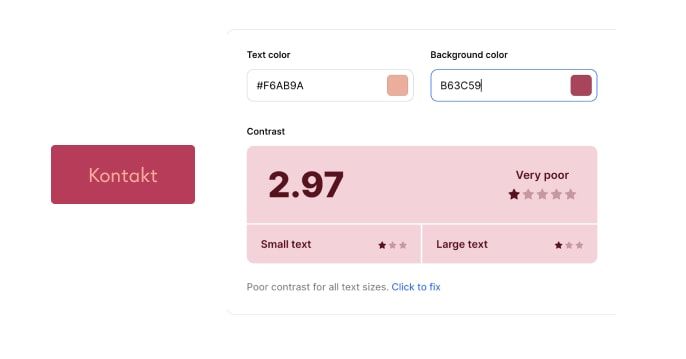

A contrast ratio of 2.97:1 is not enough. Very few people can read text in that colour combination.
What's new in WCAG 2.2
While the previous update to the guidelines took ten years, WCAG 2.2 came out in October 2023, five years after version 2.1. Work on version 3.0 is already under way, but its final form is still some time off.
The new criteria further improve usability for people with low vision and other disabilities on all devices. They also take more account of people with cognitive and learning disabilities. Here are the most important ones.
Focused elements must not be obscured
Elements you can reach with the keyboard must not be hidden by other parts of the interface, such as banners or pop-ups. This mainly helps people with motor disabilities, who move around websites largely by keyboard. It also means they can always see where they are on the page.
An alternative to dragging
Dragging with a mouse or touchpad is difficult for people with motor impairments. Every function controlled by dragging must therefore have a simpler alternative, such as clicking.
Controls that are big enough
Small buttons are a problem even with a mouse. Interactive elements must have a minimum size or enough space between them and neighbouring elements to reduce the chance of someone clicking the wrong thing by mistake.
Help always in the same place
Contact details, FAQs or other help should be in the same place on every page. This mainly helps people with cognitive impairments.
No need to enter data twice
Filling in forms is demanding for people with limited mobility or a cognitive impairment, especially when they have to type the same details repeatedly, such as identical billing and delivery addresses. The form must therefore fill them in automatically or offer them as an option.
Logging in without memory tests
Logging in must not require people to remember or retype anything. It must be possible to paste a password or one-time code, or fill it in from a password manager. The exception is tests in which people recognise objects, such as image CAPTCHAs. Even these, however, can be very difficult for people with visual or motor impairments.

For many people, retyping distorted text is an insurmountable obstacle.
Make websites accessible to everyone
Test websites with a sufficiently diverse group of users from the very start. You'll avoid flawed foundations for further development and much more expensive last-minute fixes. Follow at least the basic rules, so the website is truly accessible to everyone.
Accessible means better for everyone.
Planning a new website, or want to check how accessible your current one is? We'll go through it with you against WCAG and suggest what to change.